
So, you want to build websites and web apps. Welcome aboard! If you have opened tech Twitter or LinkedIn lately, you might think everyone has been replaced by sentient neural networks that drink motor oil and output flawless code while laughing at human fragility.
Take a breath. Nobody got replaced; things just shifted.
Being a full-stack developer has changed quite a bit over the past few years, but the core reality remains identical: someone has to understand how the browser talks to the server, how the server talks to the database, and why the submit button suddenly turned neon purple and floated off the screen.
Here is your realistic, no-nonsense roadmap to going from writing your very first line of messy code to becoming a solid, employable full-stack developer.
Stage 0: The Stuff That Hasn’t Changed Since 1999
Before jumping into fancy cloud providers or modern toolchains, you need the three foundational pillars of the web. Skipping these is like trying to build a sports car when you haven’t figured out how wheels work.
-
HTML5: This is the skeleton. Learn semantic markup. Use real buttons instead of making clickable
<div>tags and wondering why keyboard navigation broke. -
CSS3: This is the skin and makeup. Spend actual time learning Flexbox and CSS Grid. Centering a div used to be an ancient riddle, but nowadays you have no excuse. Add modern CSS features like CSS variables, nesting, and container queries so you don’t pull your hair out later.
-
Modern JavaScript: The brain. Learn variables, loops, arrays, and objects first. Then move straight into closures, the event loop, and asynchronous operations (
async/awaitand Promises). If you do not understand why an API call is taking two seconds to return data, you will end up staring at a blank screen wondering if your computer is broken.
Take your time here. Don’t rush into frameworks just because some influencer told you plain JavaScript is dead. It isn’t, and it never will be.
Stage 1: The Modern Frontend Jungle
Once you can build a decent-looking interactive page using vanilla JavaScript, it’s time to build user interfaces that don’t crumble into a mess of spaghetti code when they get bigger than three pages.
Choosing a Framework
Pick one major component-driven library or framework. The top players remain React and Vue, with Svelte hovering around as the delightfully clean alternative. React is still the safest bet for getting hired, even if keeping up with its ecosystem sometimes feels like a full-time job.
Type Safety: Stop Guessing What Your Data Looks Like
Learn TypeScript. Trying to write a modern full-stack application in plain JavaScript is like driving on the highway with your headlights off—it works fine until you hit an undefined is not a function error at 70 mph. TypeScript catches silly mistakes before your code ever hits a browser.
Styling Without Crying
Utility-first CSS, specifically Tailwind CSS, remains widely adopted across the industry. Combine that with headless UI component libraries (like Radix UI or shadcn-style patterns) so you spend your time building features instead of hand-crafting another modal window from scratch.
Stage 2: The Backend & Modern Data Plumbing
A frontend without a backend is just a digital brochure. The backend is where real work happens: processing payments, checking passwords, saving data, and stopping bad actors from deleting your company’s records.
Runtime & Frameworks
You don’t have to learn an entirely new language right away. You can run JavaScript and TypeScript on the server using Node.js or modern runtimes like Bun.
-
Learn how HTTP requests work (GET, POST, PUT, DELETE, headers, and status codes).
-
Build simple REST APIs first, then explore typed RPC approaches (like tRPC) or GraphQL depending on the team you end up joining.
Databases: Picking Where Your Data Lives
Data persistence is everything. If you restart your server and all your users vanish, your users will be very upset.
| Category | Typical Choices | Best Used For |
| Relational (SQL) | PostgreSQL | Most business logic, user auth, complex relational data. The gold standard. |
| Document (NoSQL) | MongoDB | Unstructured event logs, catalogs, rapid document prototyping. |
| In-Memory Cache | Redis | Session caching, temporary tokens, rate limiting. |
| Vector DBs | pgvector, Pinecone | Semantic search and retrieval-augmented generation (RAG) for modern apps. |
Start with PostgreSQL. Learn basic SQL queries before you lean on an ORM (like Prisma or Drizzle). If you don’t know what a foreign key or a join is, your ORM will eventually generate a query that crashes your server.
Stage 3: Authentication, Security, and Cloud Basics
At this point, you have an app that talks to a database. Now you have to keep people from breaking it.
-
Authentication: Never store passwords in plain text unless you enjoy lawsuits. Learn how hashing works (argon2/bcrypt), how JWTs and HTTP-only session cookies behave, and when it makes sense to hand the headache off to an external auth provider (like Clerk, Auth0, or Supabase).
-
Git and Collaboration: If you don’t know how to branch, commit, rebase, and open a Pull Request, you cannot work on a software team. Master basic terminal commands and Git workflows early.
-
Basic CI/CD and Cloud Hosting: Deploy your frontend and backend. Get comfortable with platforms like Vercel or Render for quick deployments, and learn containerization with Docker. Docker ensures the dreaded phrase “well, it worked on my machine” doesn’t get you fired on a Friday afternoon.
Stage 4: AI-Assisted Development (The Elephant in the Room)
Let’s address the big question: Do I even need to learn all this when AI tools can generate code?
Yes, you do. In fact, you need foundational knowledge more than ever.
AI coding assistants are like super-fast junior developers who have memorized every textbook on Earth but have zero common sense. They will write boilerplate in seconds, but they will also hallucinate non-existent libraries, produce subtle security bugs, and confidently give you solutions that break under heavy load.
-
Use AI to accelerate your learning: Ask tools to explain confusing error logs or suggest regular expressions.
-
Review every single line: If an assistant writes code you don’t understand, don’t ship it. You are the architect and the code reviewer; the assistant is just holding the wrench.
-
Learn basic integration: Modern apps frequently tie into external model APIs for smart search, categorization, and chat interfaces. Knowing how to pipe data cleanly to an API and handle streaming responses is a genuine differentiator on your resume.
Your Realistic Study Schedule
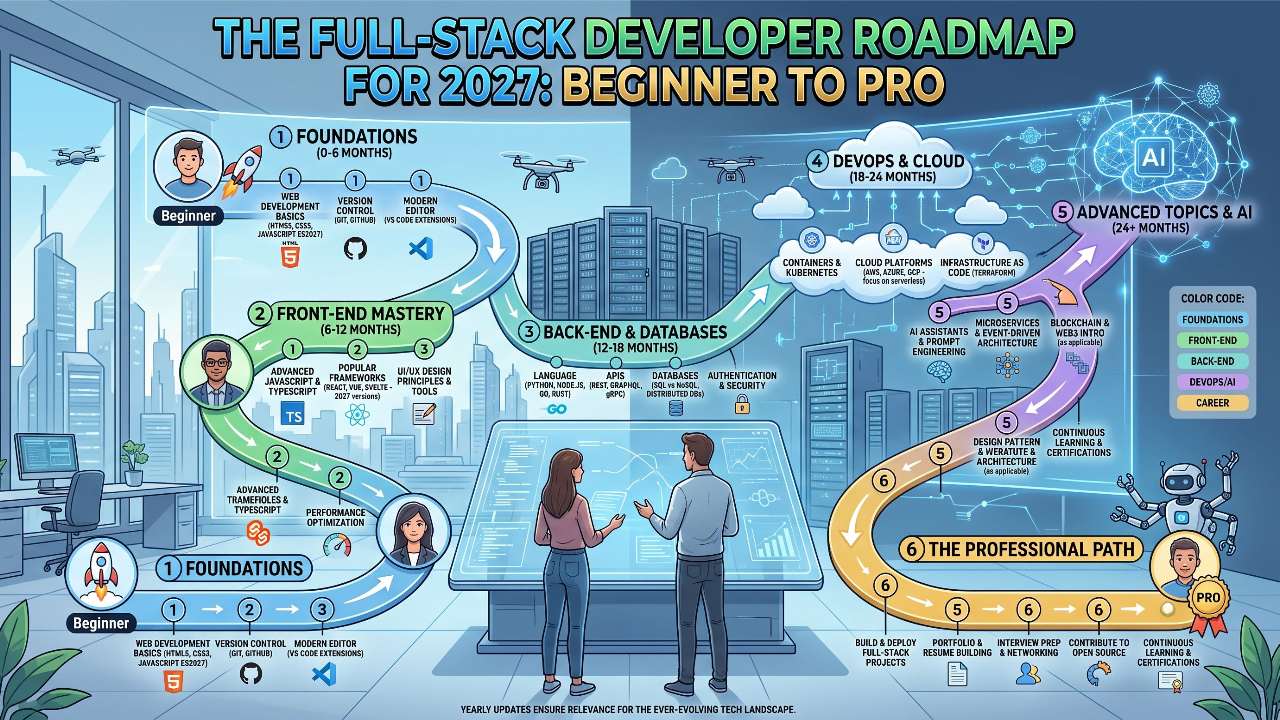
Don’t try to swallow this roadmap in two weeks. Burnout is the number one reason people quit coding, closely followed by forgetting a closing bracket somewhere in line 412.
-
Months 1–2: HTML, CSS, core JavaScript, Git fundamentals. Build static, interactive hobby pages.
-
Months 3–4: TypeScript, your chosen frontend framework (e.g., React), and basic Tailwind. Build responsive web apps that fetch data from free public APIs.
-
Months 5–6: Backend foundations with Node/Express, PostgreSQL, and basic auth. Build a simple CRUD application from scratch (a task manager, a personal blog platform, or an inventory tracker).
-
Months 7–8: Combine everything into full-stack projects. Add real authentication, containerize with Docker, deploy to the cloud, and connect an external API or basic AI workflow.
Pick a project you actually care about—whether it is a tracker for your favorite video games or a platform that reminds you to water your houseplants. Building something you want to use will teach you five times more than following another generic tutorial. Keep building, break a few things on purpose, and take it one step at a time.